
Set up Stripe Connect to get paid.
Group Fit pays all trainer earnings through Stripe Connect, directly to your US or Canadian bank account. We will email you a secure link to set up your Stripe account. Follow the nine steps below to activate it.
How payouts work
Once your trainer profile is approved, we will send you an email with a secure link to set up your Stripe Connect account. Tap the link, follow the nine steps below, and your account goes live. From then on, your earnings from every completed Group Fit session are paid into your Stripe Connect account. You then withdraw funds to your bank on the schedule you choose, daily, weekly, or manual.
What you will need
Government ID
Driver's license or passport. Legal name and date of birth must match.
Bank account
USA: routing and account number (USD). Canada: transit, institution and account number (CAD). In your legal name.
Phone for SMS
Used for two-step verification and customer support contact.
Create your login
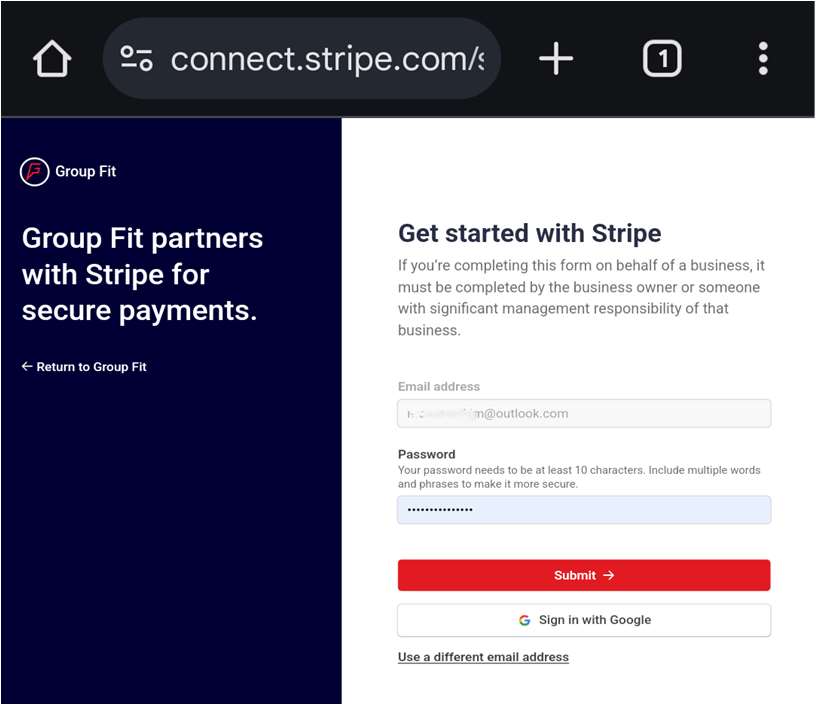
Open the link in the email we send you, then create your Stripe account credentials.
- Enter your email address.
- Create a strong password (at least 10 characters, mix of words and numbers).
- Tap Submit. Save these credentials, you will use them every time you sign into your Stripe dashboard.
Verify your phone
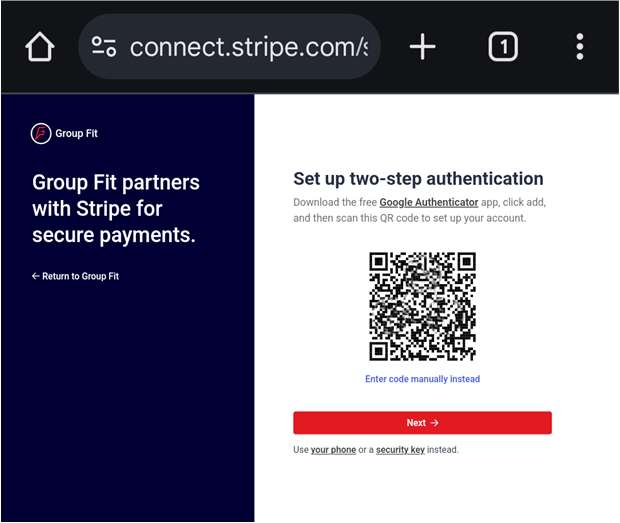
Add two-step security so only you can access your payouts.
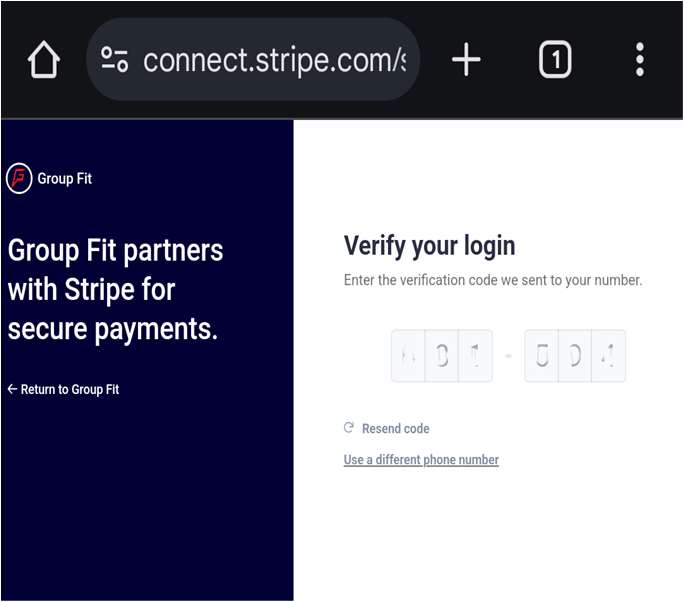
- Choose Text message as the verification method, then tap Next.
- Enter the 6-digit code Stripe sends to your phone.
Business information
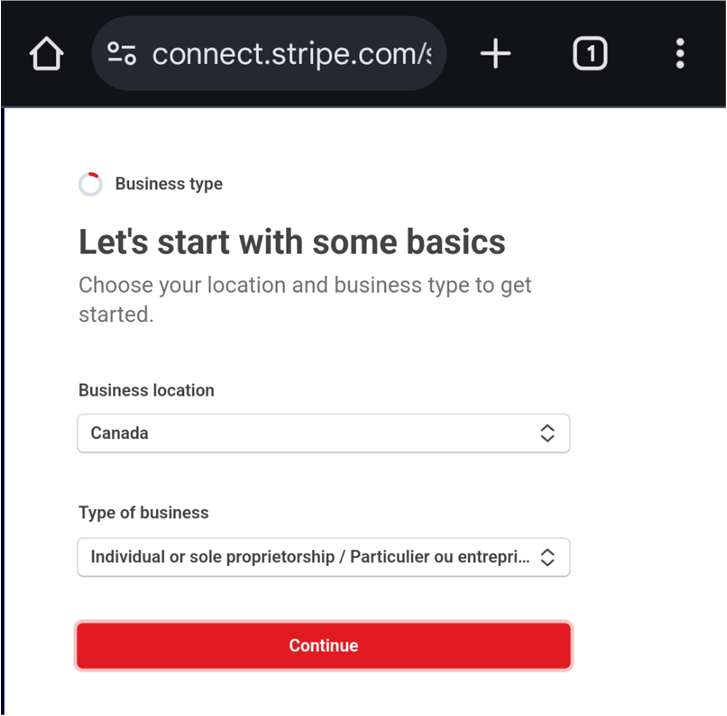
Tell Stripe where you operate and how you are set up.
- Business location: United States or Canada (where you live and work).
- Type of business: Individual or sole proprietorship.
- Tap Continue.
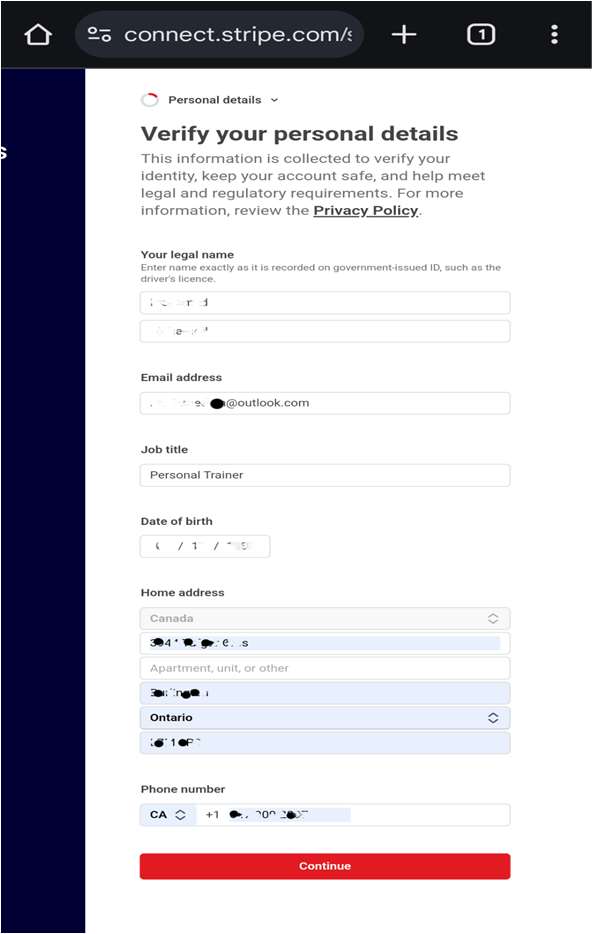
Personal details
Identity verification keeps your account secure and meets US and Canadian regulations.
- Legal name (exactly as it appears on your government ID).
- Email, job title (e.g. Personal Trainer), date of birth.
- Home address and phone number.
- Tap Continue.
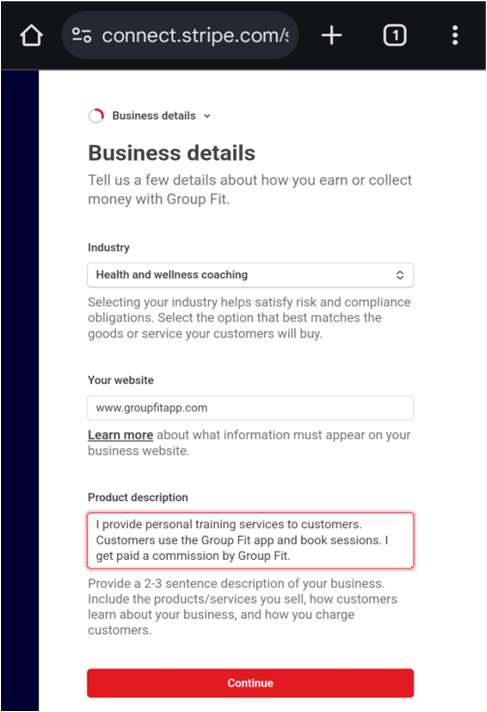
Business details
Describe what you do so payments appear legitimate to banks and customers.
- Industry: Health and wellness coaching.
- Website: your Instagram profile, personal website, or groupfitapp.com.
- Product description: a short 2-3 sentence blurb (e.g. "I provide personal training services to customers. Customers book sessions through the Group Fit app. I receive my session earnings through Group Fit.").
- Tap Continue.
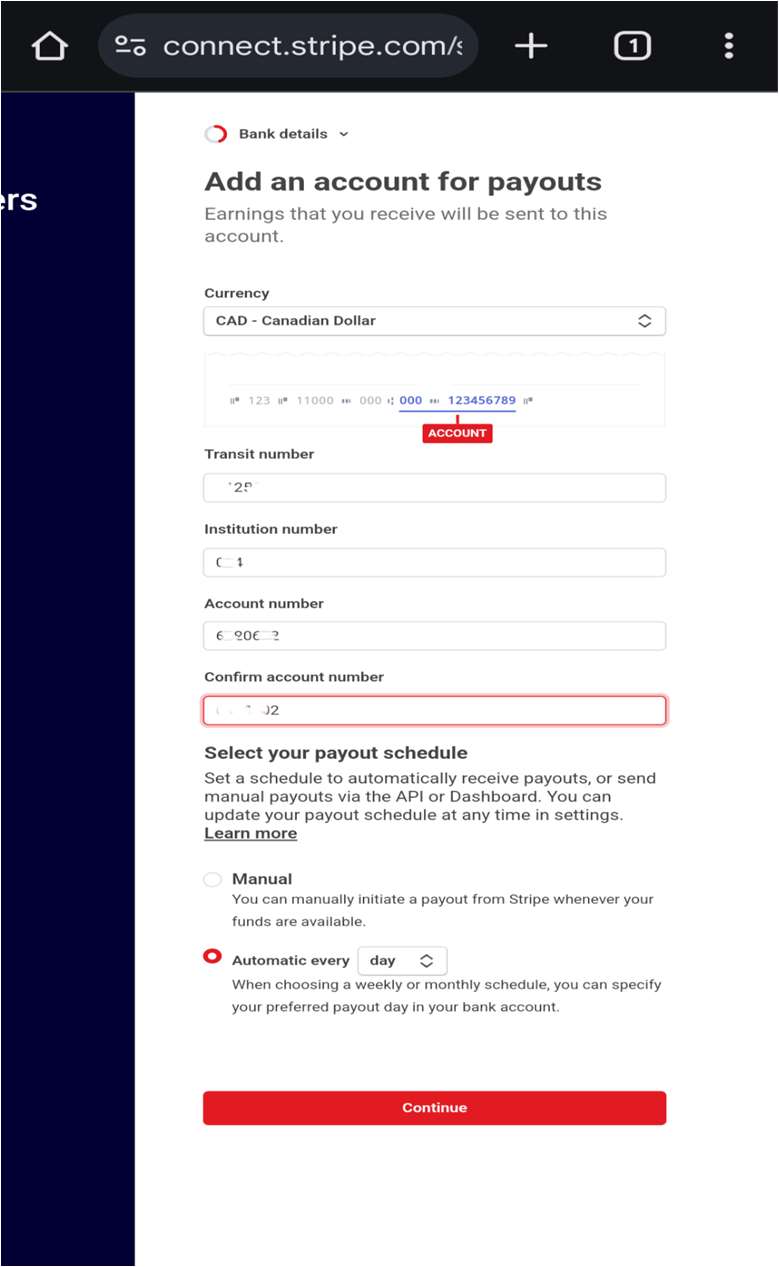
Bank account and withdrawal schedule
Link the bank account you want to withdraw your Stripe Connect balance to.
- Currency: USD if you are in the USA, CAD if you are in Canada.
- USA: enter your routing and account number. Canada: enter your transit, institution and account number. Double check, then confirm.
- Pick your withdrawal schedule from Stripe to your bank: Automatic daily (recommended), weekly, monthly, or Manual.
- Tap Continue.
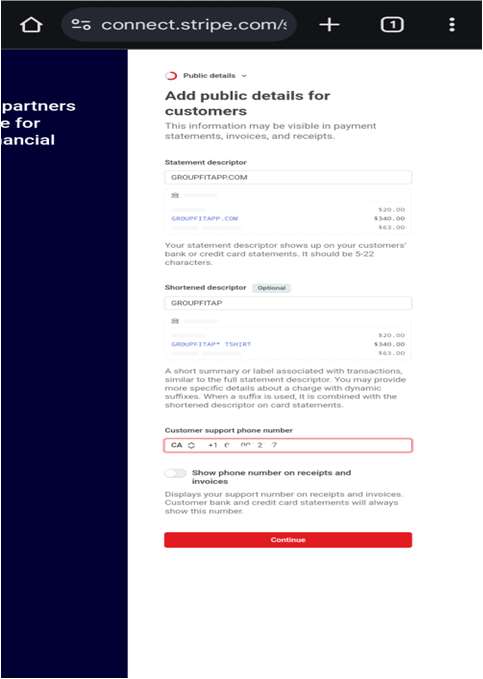
Statement descriptor
This is what customers see on their bank or card statements.
- Statement descriptor: GROUPFITAPP.COM
- Shortened descriptor: GROUPFITAPP.COM
- Customer support phone: your contact number.
- Tap Continue.
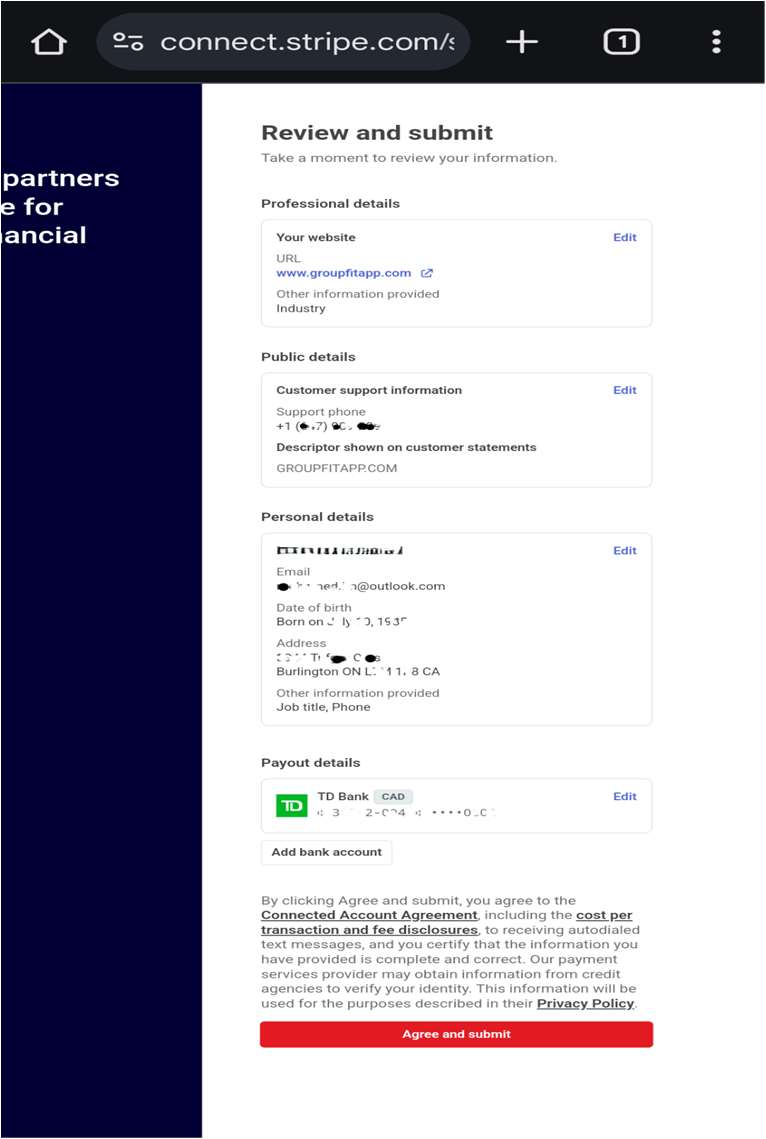
Review and submit
Final check before activating your account.
- Review every section: professional details, public details, personal details, payout details.
- Edit anything that needs correcting.
- Tap Agree and submit to accept the Stripe Connected Account Agreement.
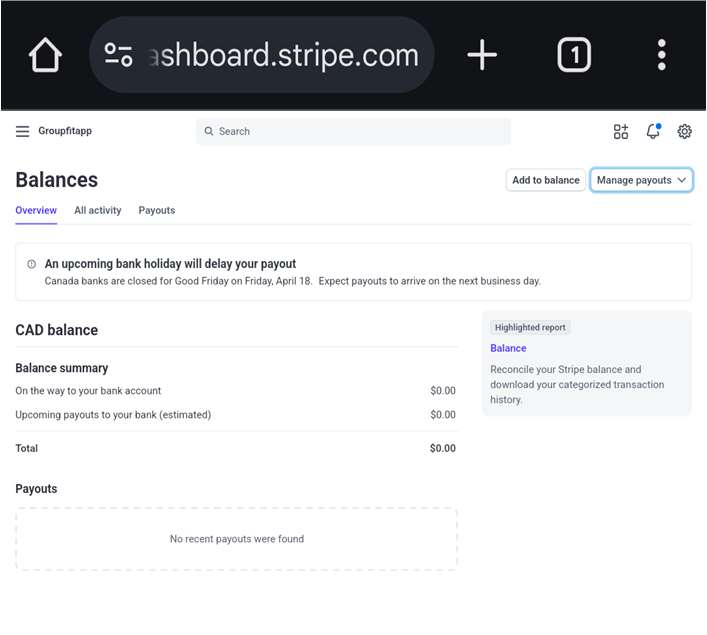
You are paid
Your Stripe Connect account is live. Group Fit deposits your earnings from completed sessions into your Stripe Connect balance. You withdraw to your bank on the schedule you picked.
- Track earnings in the Balances section of your Stripe dashboard.
- Withdrawals run on your chosen schedule (daily, weekly, monthly, or manual). Daily withdrawals land the next business day. Bank holidays may add a day.
- Stripe charges no fees for withdrawals to your bank account.
Good to know
Paid in USD or CAD
US payouts in USD. Canada, UK, Europe and Switzerland in CAD, converted by Stripe to your local currency.
No Stripe withdrawal fees
Stripe does not charge to move funds from your Connect account to your bank.
You pick the schedule
Daily, weekly, monthly, or manual withdrawals from Stripe to your bank. Change it any time in your Stripe dashboard.
Earnings via Stripe Connect
Group Fit deposits your earnings from every completed session into your Stripe Connect account.
Stripe may temporarily hold funds in line with their risk and compliance policies. Standard payout timing applies once any holds clear.
Questions about payouts or earnings?
Our trainer FAQ covers commission rates, payout timing, taxes and more.